

This guide covers Triple Whale’s Data Warehouse Export feature, which lets you export data directly into your BigQuery, Snowflake, AWS S3, or Google Cloud Storage warehouse—either as a one-time export or on a recurring schedule.
By following this guide, you’ll be able to:
- Connect a supported data warehouse (BigQuery, Snowflake, AWS S3, Google Cloud Storage)
- Create one-time or scheduled exports using SQL
- Monitor export runs, statuses, and row counts
- Manage, pause, re-run, or edit exports from a centralized page
How Data Warehouse Export Works
Key Concepts
- Data Structure: Transfer data as tables based on user-defined SQL queries.
- Export Runs: Each export can be run once immediately or configured to run on a recurring schedule.
- Security and Permissions: Control data access and permissions for secure transfers.
Architecture
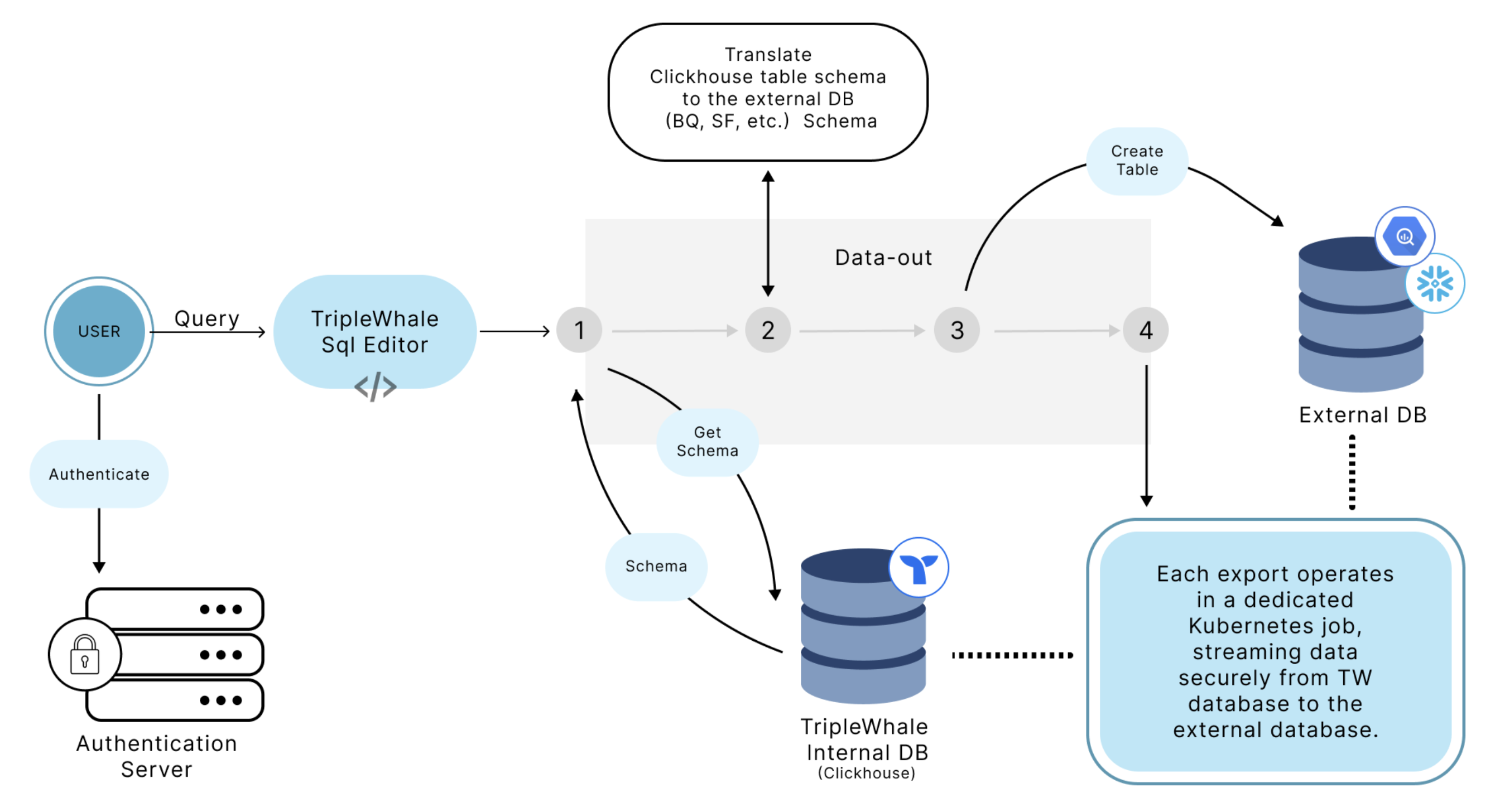
Data Warehouse Export Architecture Diagram
Security Considerations
- Password Handling: For Snowflake, passwords are used directly without specialized security tokens, so you should create dedicated accounts with limited access to use for exporting data. (For BigQuery, users only need to grant write access to a specific dataset, so password security isn't a concern.)
- Data Protection: Users should create isolated datasets or tables specifically for export operations to avoid compromising broader data access.
Data Structure and Export Behavior
Table Creation and Schema
- Automatic Table Creation: Tables are created automatically based on the schema defined in the SQL query executed within the Triple Whale platform.
- Data Types: To ensure compatibility and future-proofing, data types are standardized. For instance, Triple Whale low-cardinality columns are represented as strings for flexibility.
- Schema Adjustments: The output table schema is not editable. If a schema change is needed, a new table must be created.
Data Freshness and Historical Data
- Run Frequency: Exports can be run once immediately or on a recurring schedule (e.g., hourly, daily, weekly).
- Appending Data: Each export run appends new data rows; existing data is not replaced. Users should manage deduplication on their end if needed.
- Historical Backfill: Users can run custom SQL queries to extract historical data in batches (e.g., month-by-month) for backfilling.
Common Errors and Troubleshooting
- Connection Issues: If the setup fails, verify that the provided credentials, project ID, and dataset ID are correct. Restart the process if errors persist.
- Permission Errors: Ensure that the service account or user account has been granted the necessary permissions for writing data.
- Table Name Conflicts: Verify that the new table name is unique to prevent overwrite or duplication errors.
Best Practices
- Managing Schema Changes: If a schema change is necessary, create a new table with the updated schema.
- Performance Optimization: For optimal performance, avoid exporting overly large data sets at frequent intervals. Break down data into manageable chunks if possible.
- Testing Exports: Run an initial export with a small query and review row counts and sample data in your warehouse before relying on recurring exports.
- Permission Management: To maintain data security, manually restrict data access through allow-listing or by creating service accounts with user-specific permissions.
- Data Segmentation: Export data in manageable batches to optimize performance and avoid timeouts.
FAQs
When should I use Data Warehouse Export vs the Custom SQL API?
Use Data Warehouse Export when you want Triple Whale to push complete datasets into your data warehouse, either as a one-time export or on a recurring schedule.
Use the Custom SQL API if you want to pull data on demand for dashboards, ad hoc analysis, or custom pipelines.
| Custom SQL API | Data Warehouse Export |
|---|---|
| You pull data via API | Triple Whale pushes data to your warehouse |
| You handle scheduling and automation (e.g. dbt, scripts) | Built-in option for one-time or scheduled exports |
| Slower for large exports; limited by rate and response size | No limits on data size—export complete datasets |
| Best for dashboards, ad hoc queries, custom pipelines | Best for exports, BI pipelines, and full backfills |
How do I create a data warehouse export?
Create a new export from the Data Warehouse Export page by selecting a destination, defining a SQL query, and choosing whether to run it once or on a recurring schedule.
How often can an export run?
Exports can be run once immediately or configured to run on a recurring schedule, depending on your needs.
Is data deduplication handled?
No. Users need to implement deduplication strategies within their data warehouse.
What if schema changes are required?
Create a new table and update your workflow to use the new schema.
How secure is the data during the export process?
Data security is maintained through user-defined permissions and encrypted connections. Users should manage data access through restricted accounts or specific data sets.
What happens if an export fails?
While detailed client-facing error logs are not yet available, users should check connection settings and workflow configurations. If problems persist, contact Triple Whale support.
Can I include specific fields or exclude certain data?
You can customize the SQL query to control the specific data structure and content that is exported.